Offline Subtitle Generator
Generate subtitles from local video and audio files without uploading anything to the cloud. SubSmith runs Whisper locally, so the files stay on your machine.
What It Does
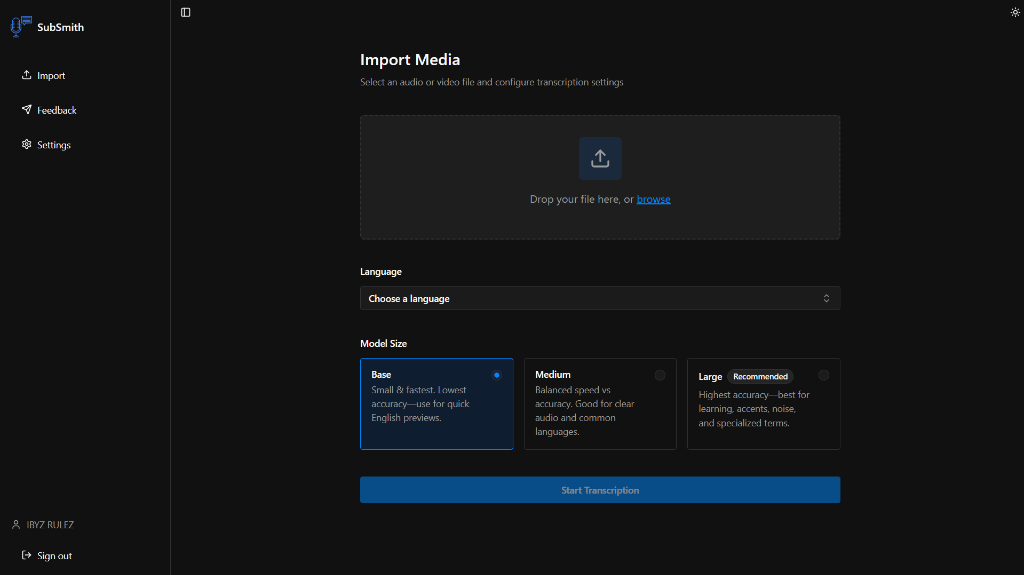
SubSmith is built for people who work with local media. Drop in MP4, MKV, AVI, MP3, or WAV files, generate timestamped subtitles, edit them inline, and export to SRT or plain text.
- Works with local video and audio files
- No internet connection required after setup
- Editable timestamped subtitles
- SRT export for players and editors
How It Works
- Open your local file in SubSmith
- Choose the language and Whisper model
- Run transcription on CPU or GPU
- Review the subtitles and export the result
See the Workflow
These are the parts of the app that matter most for subtitle generation: importing media, reviewing subtitles, looking up words, and saving useful lines for later study.


Best For
- Downloaded movies and TV episodes
- Audio lessons and podcasts
- Privacy-sensitive material that should not be uploaded
Why SubSmith
Most subtitle tools are browser-first and assume you want to upload a short clip. SubSmith is better when you want to work with long local files, keep your data private, and avoid upload limits.
Built for Learning, Not Just Export
Most subtitle tools stop at transcription and export. SubSmith also supports popup dictionary lookup while you read through subtitles and lets you turn useful lines into flashcards for later review.
- Popup dictionary support for quick word lookups while reviewing subtitles
- Flashcard creation from subtitle lines for Anki-based study workflows
- Useful if you want subtitles and a language-learning workflow in the same app


Download SubSmith
Start a 7-day free trial and generate subtitles from your own media. Review them, look up words instantly, and save useful lines as flashcards.