Practical Anki Settings for Immersion Learning (2026)
Sentence cards often take longer to review than isolated vocabulary cards because they can include audio, context, and an image. This guide offers conservative starting points for immersion learners, explains how to watch your workload, and shows which card fields SubSmith can send to Anki. Treat the values as defaults to test, not universal rules.
Why Sentence Cards Need Their Own Review Budget
A sentence card—with audio, context, and sometimes a screenshot—can take longer than a simple recognition card. Adding too many new cards therefore creates more future reviews than the same count of lightweight vocabulary cards. Research on spaced practice (Cepeda et al., 2006) supports spacing study over time, but it does not prescribe one perfect Anki configuration for every learner.
The Default Configuration Problem
- New cards compound: every new card creates future reviews
- Sentence cards take longer: audio and context increase review time
- Large backlogs reduce consistency: pause new cards if due reviews become unmanageable
- Retention is personal: adjust settings using your own workload and recall
If your due count keeps rising or reviews take more time than you can sustain, reduce new cards first. That is a workload problem, not evidence that sentence mining itself has failed.
Conservative Starting Settings
The values below are starting points, not performance guarantees. Test them for several weeks and adjust based on retention, daily review time, and whether you can keep the routine consistent.
New Cards Per Day
- Start with 10-15 new cards/day until you stabilize below 100 daily reviews
- Scale up slowly only when reviews stay stable for a full week
- Increase cautiously: higher counts can work, but only when the resulting reviews fit your schedule
- Monitor the trend: pause new cards when due reviews or review time become difficult to sustain
Many learners make the mistake of starting at 20 new cards/day because "the default says 20." This causes a compounding review debt that takes months to escape. Start conservative. You can always add more cards once the system stabilizes.
Learning Steps
Learning steps are the intervals you see when a card is fresh. Anki's behavior and recommended setup can vary by scheduler version, including whether you use FSRS. Check the current Anki manual before copying a fixed sequence.
- Simple starting point: keep learning steps limited and let the scheduler handle longer spacing
- If you use FSRS: follow the manual's guidance rather than copying legacy interval recipes
- If cards repeatedly fail: improve the card or lower its difficulty before adding more steps
Graduating Interval
The graduating interval is how many days a card waits after passing all learning steps. Default is 1 day.
- Start with the scheduler default unless your review history gives you a reason to change it
- Avoid arbitrary tuning: a longer interval reduces reviews but may also reduce retention
- Change one variable at a time so you can observe the effect
Maximum Reviews Per Day
A daily limit can protect your available study time, but hiding due reviews also creates a backlog. The better first response is usually to reduce or pause new cards.
- Choose a time budget based on what you can repeat most days
- Pause new cards first when due reviews begin accumulating
- Use a cap deliberately if you understand that unseen reviews remain due
- Prefer fewer good cards over a large queue of weak ones
Lapses and Relearn Steps
Lapses are cards you fail (hit the red "Again" button). The relearn steps determine when they come back.
- Default: 10m is too short for sentence cards
- Recommended: 10m 1d
- Why longer steps? A failed sentence card needs time before you see it again. Hitting it again in 10 minutes is often frustrating and ineffective.
- Lapse penalty: Reduce the review ease to 70-80% (default is often 60%). This prevents older cards from dominating.
Comparison Table
| Setting | Default | Immersion-Optimized | Why |
|---|---|---|---|
| New cards/day | 20 | 10-15 (scale to 25) | Prevents review debt spiral |
| Learning steps | 1m 10m | 1m 10m 1h 1d | More exposure before graduation |
| Graduating interval | 1 day | 3-4 days | Confident card spacing |
| Max reviews/day | None | 150-200 | Prevents burnout |
| Lapse steps | 10m | 10m 1d | Failed cards need recovery time |
| Ease factor | 2.5 | 2.0-2.3 | Better long-term spacing |
Card Template Best Practices
The template determines what appears on the front and back of your card. For immersion learning, less is more.
Front of Card (What You See First)
- Show the sentence only (no translation, no answer)
- Include audio playback so you hear the sentence first
- Font size: 18-24pt for easy reading while listening
- Example: "この映画は本当に素晴らしい。" (with play button)
Back of Card (Answer)
- Repeat the sentence (confirmation)
- New word definition (which word was studied? what does it mean?)
- Audio clip attached (exact moment from source)
- Screenshot (optional) for visual memory hook
- Keep translations optional and concise; use them when they clarify the tested meaning
The key principle: let the context (scene, voice, audio) be your translation, not an English sentence.
Common Mistakes
- Showing the answer on the front (defeats spacing repetition)
- Including translation on the back (kills immersion benefit)
- No audio playback (loses context memory hook)
- Too much text (overwhelms the brain with reading)
How SubSmith Pre-Configures Cards
SubSmith reduces the manual steps in a local-media card workflow. The first time you add a card, configure your deck, note type, and field mappings. Later exports can reuse that mapping when Anki and AnkiConnect are available.
The SubSmith Workflow
- Hover over word: In the transcript pane or video subtitle overlay, hover over any word to see its definition
- See context: The popup shows the full sentence context + word definition
- One-click add: Click "Add to Anki" button on the popover
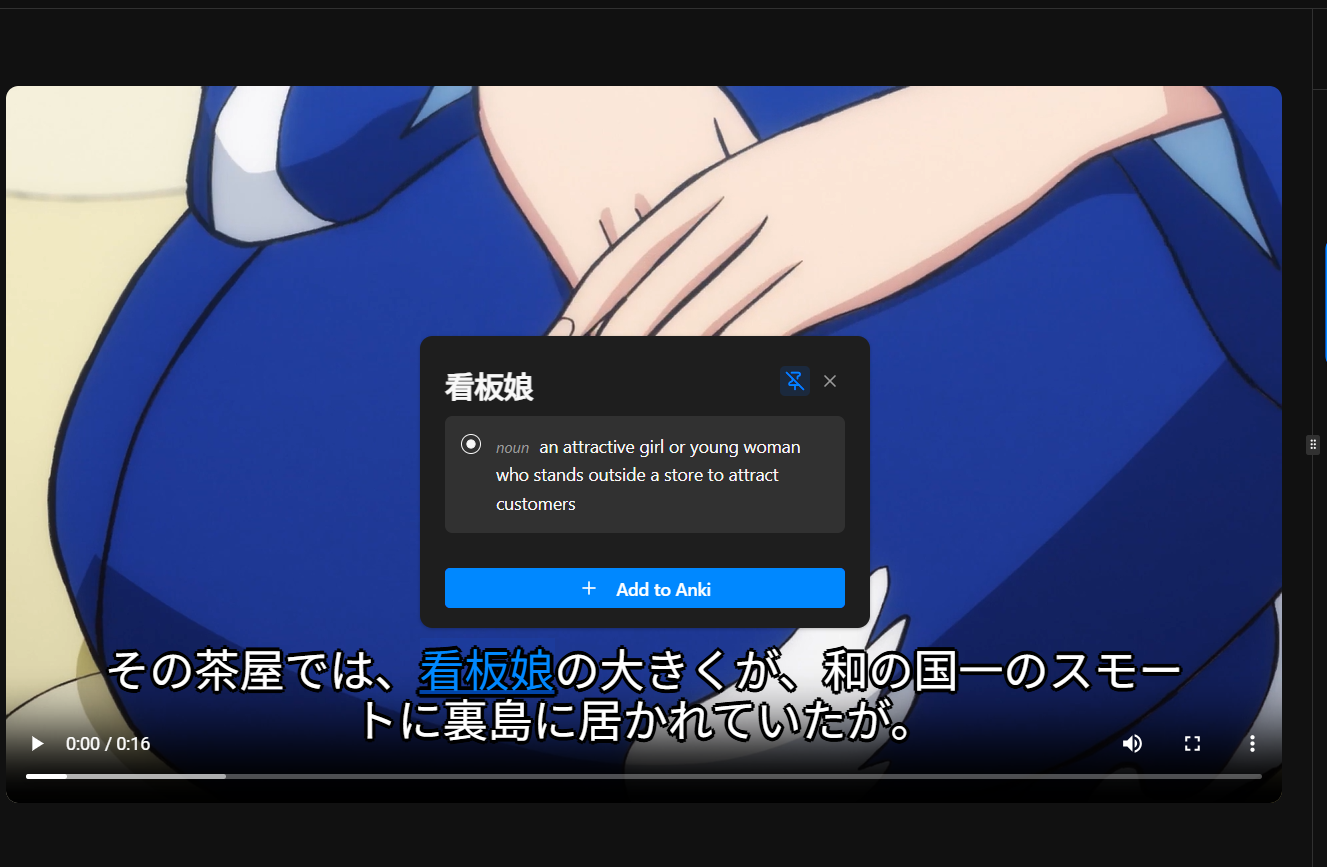
- First setup (once): On your first card, choose deck, note type, and field mappings. SubSmith offers optimized Note Types that work with all components
- Card created: SubSmith sends the mapped context, audio clip, definition, and optional screenshot fields
- Repeat: Reuse the saved mapping for later cards
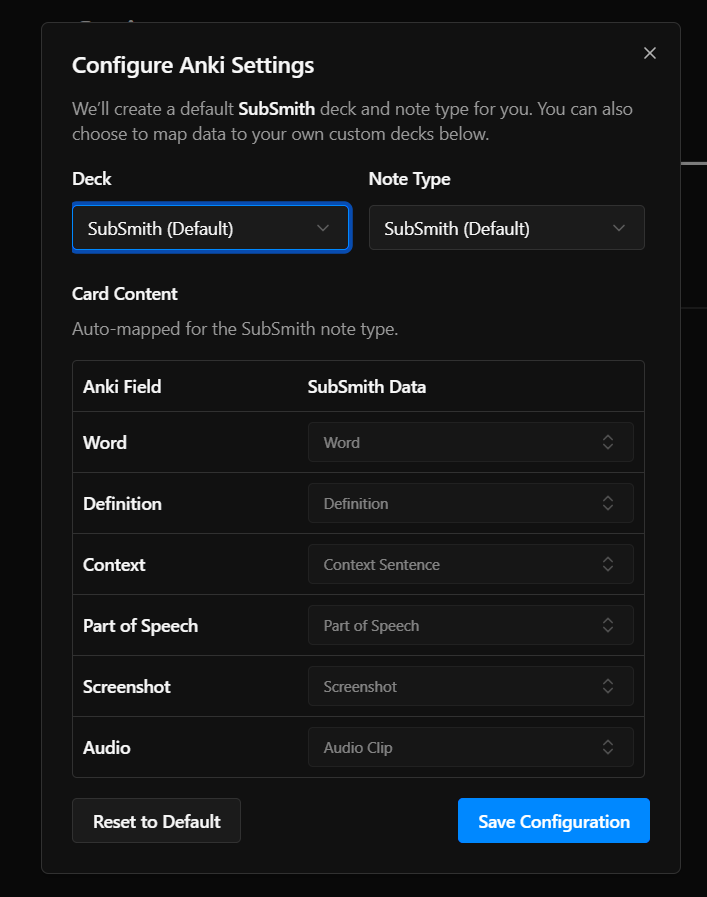
What Gets Added Automatically
- Context sentence: The full phrase or dialogue containing the word
- Audio clip: Extracted at millisecond precision from the source
- Definition: Word lookup from dictionary
- Screenshot (optional): Visual context from the scene (one checkbox toggle)
Export time depends on the media, selected fields, and whether the card needs editing. The practical benefit is fewer application switches and less manual clipping, not a guaranteed number of seconds per card.
SubSmith Note Types vs. Custom Templates
SubSmith includes pre-built Note Types designed specifically for immersion learning. These templates work seamlessly with all card components (audio, definitions, screenshots). However, you can also map to your own custom note types if you prefer to use an existing template setup.
- SubSmith Note Types (recommended): Optimized for sentence mining, handles all components automatically
- Custom Note Types: Full field mapping support if you want to use your own template configuration
Troubleshooting: What If My Reviews Are Already Out of Control?
If you're already drowning in daily reviews (300+), don't panic. You can recover. Here's the rescue plan.
The Review Debt Spiral Recovery Plan
- Pause new cards: Stop adding anything until reviews drop below 200/day
- Set review cap: Limit daily reviews to 150 (this alone cuts days from backlog)
- Do reviews consistently: Even 10 minutes/day clears debt faster than marathon sessions
- After backlog clears: Start fresh with 10-15 new cards/day, not 20
Expected timeline: If you have 3,000 cards with 300 daily reviews pending, you'll clear it in about 10 days at 150/day. Then you can build new habits without the weight of old debt.
Prevention is Easier Than Recovery
- Start conservative (10-15 new cards/day)
- Set a review cap early (150/day from day one)
- Monitor trends weekly (are reviews climbing?)
- Pause before burnout (not after)
Example: The Math of Two Approaches
Default Settings (Leads to Burnout)
Setup: 20 new cards/day, 1m 10m learning steps, 1 day graduating interval, no review cap
- Days 1-30: 20-30 daily reviews (manageable)
- Days 31-60: 150+ daily reviews (starting to feel heavy)
- Days 61-90: 250+ daily reviews (overwhelming)
- Result: Learner burns out, abandons deck at 2,000 cards
Immersion-Optimized Settings (Sustainable)
Setup: 15 new cards/day, 1m 10m 1h 1d learning steps, 3-day graduating interval, 150 review cap
- Days 1-30: 10-20 daily reviews (easy)
- Days 31-60: 80-120 daily reviews (steady)
- Days 61-90: 120-150 daily reviews (stable plateau)
- Result: Learner sustains 5,000+ cards long-term
Same content, different settings = completely different user experience.
Scaling Your Settings Over Time
As you build experience with Anki and improve your language level, you can adjust settings for faster acquisition.
Early Stage (First 1,000 cards)
- 10-15 new cards/day
- Learning steps: 1m 10m 1h 1d
- Review cap: 150/day
- Goal: Build stability and consistent habits
Intermediate Stage (1,000-3,000 cards)
- 20-25 new cards/day (once reviews stable)
- Learning steps: 1m 10m 1h 1d (keep same)
- Review cap: 200-250/day
- Goal: Accelerate acquisition without overload
Advanced Stage (3,000+ cards)
- 30-50 new cards/day (for advanced learners only)
- Learning steps: can shorten to 1m 10m 1h
- Review cap: 300/day (if time permits)
- Goal: Maximize vocabulary growth (audio sentences vs. vocab cards)
Personal Experiment: Find Your Rhythm
Everyone has different study capacity. Some learners thrive with 30 new cards/day; others burn out at 15. Use these settings as a baseline and adjust based on your actual review counts. The goal isn't speed—it's sustainability.
Related Resources
Get more context on sentence mining and vocabulary acquisition:
- Complete Guide to Sentence Mining: Full workflow from mining to Anki export
- Japanese Anki Flashcards Setup: Practical card format and level-based settings
- Spanish Anki Flashcards Setup: Listening-focused card templates and review pacing
- Korean Anki Flashcards Setup: Sentence-first setup for TOPIK progress
- What is Comprehensible Input?: Why context matters in immersion learning
- The 10,000 Sentence Method Explained: Fluency targets and realistic timelines
- SubSmith vs Language Reactor: When to use desktop tools for sentence mining
- Is Anki Free?: Platform-by-platform pricing breakdown (desktop, Android, iPhone)
FAQ
- What if my reviews are already out of control? Pause new cards immediately and set a hard review cap (150/day). Clear the backlog at your own pace. You'll stabilize in 2-4 weeks. Then restart with 10-15 new cards/day from scratch.
- Should I sentence mine or use vocab-only cards? Use sentence cards when context or listening is part of what you want to remember. Short vocabulary cards can still be useful for high-frequency items or quick recognition. Test both against your own retention and review time.
- Can I import my existing Anki deck? Yes. SubSmith maps exported fields into an existing Anki note type and deck through AnkiConnect. Whether a new card retains better depends on its design and your review history, not simply where it was created.
- What is the "ease factor"? Ease is part of Anki's legacy scheduling behavior. Read the current Anki documentation, especially if you use FSRS, before changing it. Lower intervals create more reviews but do not automatically guarantee better retention.
- How much time should I spend reviewing daily? At 150 reviews/day with sentence cards (15-20 sec each), expect 40-50 minutes. Some days less, some more. If it's exceeding 1 hour consistently, lower your new cards/day.
- Should I use Anki on mobile or desktop? Desktop for learning (better for audio, screenshots). Mobile for reviewing mature cards while commuting. Use AnkiDroid (Android) or AnkiMobile (iOS) for sync. SubSmith exports to desktop Anki.
- What if I miss a day of reviews? Don't stress. Anki is forgiving. Just pick up the next day. Missing one day adds maybe 10 extra cards to review the following day. Long streaks matter more than perfection.