SubSmith vs Language Reactor: Which Tool is Right for Your Immersion Workflow?
Language Reactor and SubSmith solve different parts of an immersion workflow. Language Reactor is useful when you study on supported streaming sites; SubSmith is built around video and audio files you already have on your computer. The practical question is not which tool wins overall, but where your media lives and what you want to do with each useful line.
Quick Comparison
| Feature | Language Reactor | SubSmith |
|---|---|---|
| Platform | Browser Extension (Chrome) | Native Desktop App (Win/Mac) |
| Media workflow | Supported browser and streaming contexts | Local video and audio files |
| Subtitle generation | Depends on the source and available subtitles | Local Whisper transcription with editable timestamps |
| Anki workflow | Export saved items as an Anki deck package | Direct export through AnkiConnect with audio and optional image |
| Offline use | Depends on supported browser contexts | Designed for local-file workflows |
| Processing | Varies by source and feature | Transcription runs on your computer |
| Price | Free and paid options | 7-day trial, then $15/year or a $40 one-time Lifetime licence |
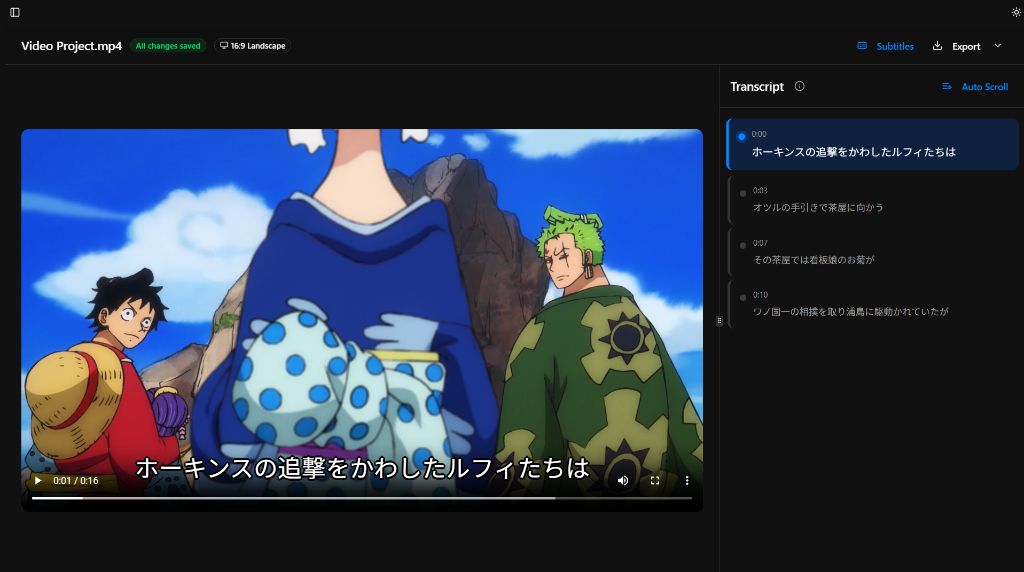
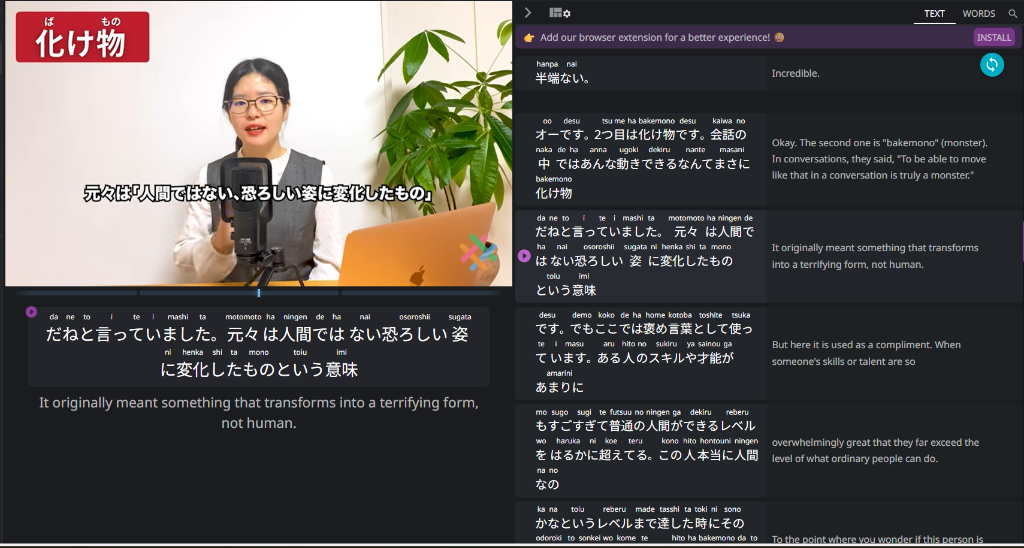
The comparison matters most when a subtitle needs more than reading: review the timing, look up an unfamiliar word, or save the line with its audio for an Anki card. Those are desktop, local-file tasks that are worth evaluating against your own media before choosing a workflow.
The "Browser Bottleneck" Problem
Language Reactor is a browser extension, so its workflow depends on the browser, the source site, and extension support. It introduced local-file support in late 2025, but a desktop-first option can be a better fit when your study library is mostly downloaded media.
- Source dependence: the available workflow changes with the browser and supported platform.
- Local-media friction: downloaded files and subtitle tracks need their own handling.
- Offline constraint: browser-first tools are not the same as a dedicated local-media workflow.
When to Stick with Language Reactor
If your primary goal is casual browsing on Netflix or YouTube and you don't intend to build a permanent Anki library, Language Reactor is still the best tool for the job.
Best For
- Casual streaming on Netflix and YouTube
- Learners who don't want to download media
- Using the "Catalog" feature to discover new shows
When to Use SubSmith (The "Pro" Alternative)
SubSmith was built for people who download their movies and want a workflow that just works, without any lag or syncing issues.
Key Advantages
- Local media: open your own video and audio files in a desktop workflow.
- Editable subtitles: generate a timestamped transcript locally, then review it before export.
- Anki workflow: save useful subtitle lines with audio and an optional screenshot.
- Offline study: work with downloaded media rather than depending on a streaming source.
When Your Source Does Not Have Usable Subtitles
The biggest difference appears when your local media has no matching subtitle track. SubSmith can run Whisper locally to create an editable transcript from the audio. Automatic transcription can still mishear names, overlapping dialogue, music, or slang, so review important lines before turning them into study cards.
- If a streaming source already has accurate subtitles, Language Reactor may be the simpler option.
- If a local file has missing or mismatched subtitles, SubSmith gives you a transcript you can edit and export.

The Verdict: Workflow over Features
The choice is really about how much friction you want in your study session. If you spend 10 minutes fighting with a browser or fixing a broken transcript, you've lost 10 minutes of actual learning.
Final Recommendation
| If you... | Choose |
|---|---|
| Watch 90% of content on Netflix/YouTube | Language Reactor |
| Download MKVs/Anime/Dramas for mining | SubSmith |
| Value 100% Privacy and Offline access | SubSmith |
| Want one-click Anki cards with Audio | SubSmith |
Most people find it's best to use both. Use Language Reactor for browsing and finding new things, then download the ones you really love and use SubSmith to study them more closely.
Related Guides
- What is Sentence Mining?: The methodology behind SubSmith
- Why a Desktop App?: Why browsers aren't enough
- How to Setup AnkiConnect: Getting your first cards exported
FAQ
- Why does SubSmith cost $15/year if it runs locally? The transcription runs on your machine, while the paid plan supports continued app maintenance, compatibility work, and product development.
- Can I use SubSmith for free? Yes! We offer a 7-day free trial of the full software so you can test the ASR quality against your specific local files before committing.
- Does SubSmith offer a one-time purchase? Yes! SubSmith offers a 7-day free trial, then annual ($15/year) or lifetime ($40 one-time) plans.
- How do I move my LR "Saved Words" to SubSmith? Language Reactor can export saved items as an Anki deck package, CSV, or JSON. Import the deck package into Anki, then use SubSmith with that Anki collection when you want to add cards from local media through AnkiConnect.